Owning the Agent Loop
Rebuilding my mentoring workflow as a small Python agent to make its behavior observable.
October 2026 · AI · Python · Observability
I built an agentic workflow in Claude Desktop to assist with my mentoring work. It was useful—but it left me with a central question: how well was it actually performing? The process was mostly a black box, and that black box was shaped like the Claude Desktop interface—it showed me some of what was happening, but many of the decisions between my request and the final response remained obscured.
I decided to rebuild the workflow as a small Python agent. I wanted to understand the mechanics for myself, make its behavior observable, and eventually develop a meaningful way to evaluate its output. Here’s what changed when I moved the agent loop from an opaque interface into code I could inspect, instrument, and evaluate.
Architecture overview
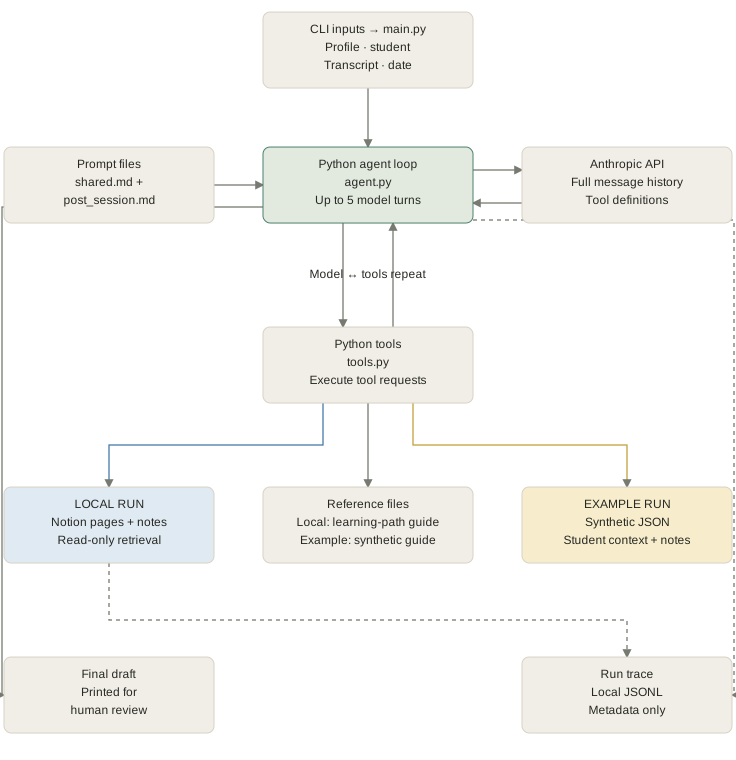
The agent is a small, command-line Python application that orchestrates an LLM-driven mentoring workflow. The system separates agent orchestration, data access, and operational logging so that each run can be inspected and eventually evaluated.
At runtime, the user selects one of three workflows:
- New student: creates or prepares an initial student context.
- Pre-session: assembles relevant context and generates material to support an upcoming mentoring session.
- Post-session: processes a completed session, producing a summary and drafting responses for required administrative follow-up.
For a post-session run, the application takes the student’s name, session transcript, and session date. It loads the workflow-specific instructions, packages them with the request and available tool definitions, and sends them to the Anthropic API.
Agent loop
The application implements the agent loop directly in Python, without using an agent framework such as PydanticAI or LangChain. At each turn, the model can return a final response or request one or more tools. When it requests a tool, the Python application:
- Identifies the requested function and validates its inputs.
- Executes the corresponding retrieval or data-access operation.
- Adds the tool result back into the conversation context.
- Calls the model again with the updated context.
This continues until the model returns a final response or reaches the five-turn limit. The turn limit bounds each run, making execution more predictable and behavior easier to evaluate.
Data profiles
The system supports two profiles:
- Local profile: retrieves real student context from Notion and is used in the live mentoring workflow.
- Example profile: reads from a synthetic student-data JSON file designed around realistic scenarios. It allows the workflow to be demonstrated, tested, and reviewed without exposing real student information.
Both profiles use the same orchestration logic and Anthropic API integration. The final output summarizes the session and drafts responses for post-session administrative tasks.
Observability layer
A separate process captures operational metadata—such as model calls, tool execution, retrieval activity, and latency—without retaining the underlying student information.
This separation is intentional: the agent produces useful mentoring outputs, while the observability layer creates the evidence needed to inspect system behavior. Instead of treating the final response as the only artifact worth evaluating, the architecture preserves a trace of how the response was produced.
Tool choice
Building the agent loop directly made several system boundaries more visible: tool use, API calls, memory and context, and system instructions. I identified capabilities shared across the pre-session, post-session, and new-student modes, then implemented them as deterministic Python functions.
For the first version, I gave the agent three tools:
get_student_contextget_latest_session_notesget_path_context
Each tool has a narrow responsibility.
get_student_context retrieves a student’s background
and current project. get_latest_session_notes finds
the notes from their most recent session.
get_path_context loads the reference guide for their
learning path.
The tools themselves are deterministic: given the same valid input and unchanged source data, the underlying Python produces the same output each time. That means that the model does not decide how to search Notion, how to select the latest session notes, or which reference file corresponds to a learning path. Those rules are coded deterministically, where they can also be inspected and tested.
The model operates within those boundaries: it determines which available tools to call, supplies their arguments, and interprets the results alongside the system instructions. It might request multiple tools during one turn, or request another tool after reviewing the first result, or conclude that it already has the information it needs to respond.
Defining the tools gave me more control, but it also exposed an important design question that I didn’t think about in Claude Desktop: if a tool call is essential and the required sequence is predictable, should the model make that decision at all?
For example, every post-session response should be grounded in the correct student context and learning-path guide. Making those functions available as tools does not guarantee that the model will call them. A sufficiently capable model may usually follow the instructions, but “usually” is not the same as enforcing a requirement.
Owning the loop didn’t make the workflow fully deterministic. It allowed me to see where deterministic code ended and model judgment began. I came to see that boundary as one of the central design decisions in an agentic workflow: which actions must happen predictably, and which decisions genuinely benefit from the model’s ability to interpret context?
Observing the workflow
Once the agent loop was explicit, the next question was what to record about it. Could I inspect the system without reproducing sensitive student data in the logs?
Logging everything—the transcript, prompts, tool arguments, Notion results, and final response—would make debugging easier. It would also reproduce sensitive student information, turning the observability layer into a possible privacy leak.
Instead, I designed for purpose-limited observability: recording enough evidence to investigate a run without storing its underlying content.
The trace records:
- when a run started and ended;
- which model and workflow mode were used;
- which tools were called and whether they succeeded;
- model, tool, and Notion latency;
- token usage;
- whether the expected context was found;
- how the run failed, if it did.
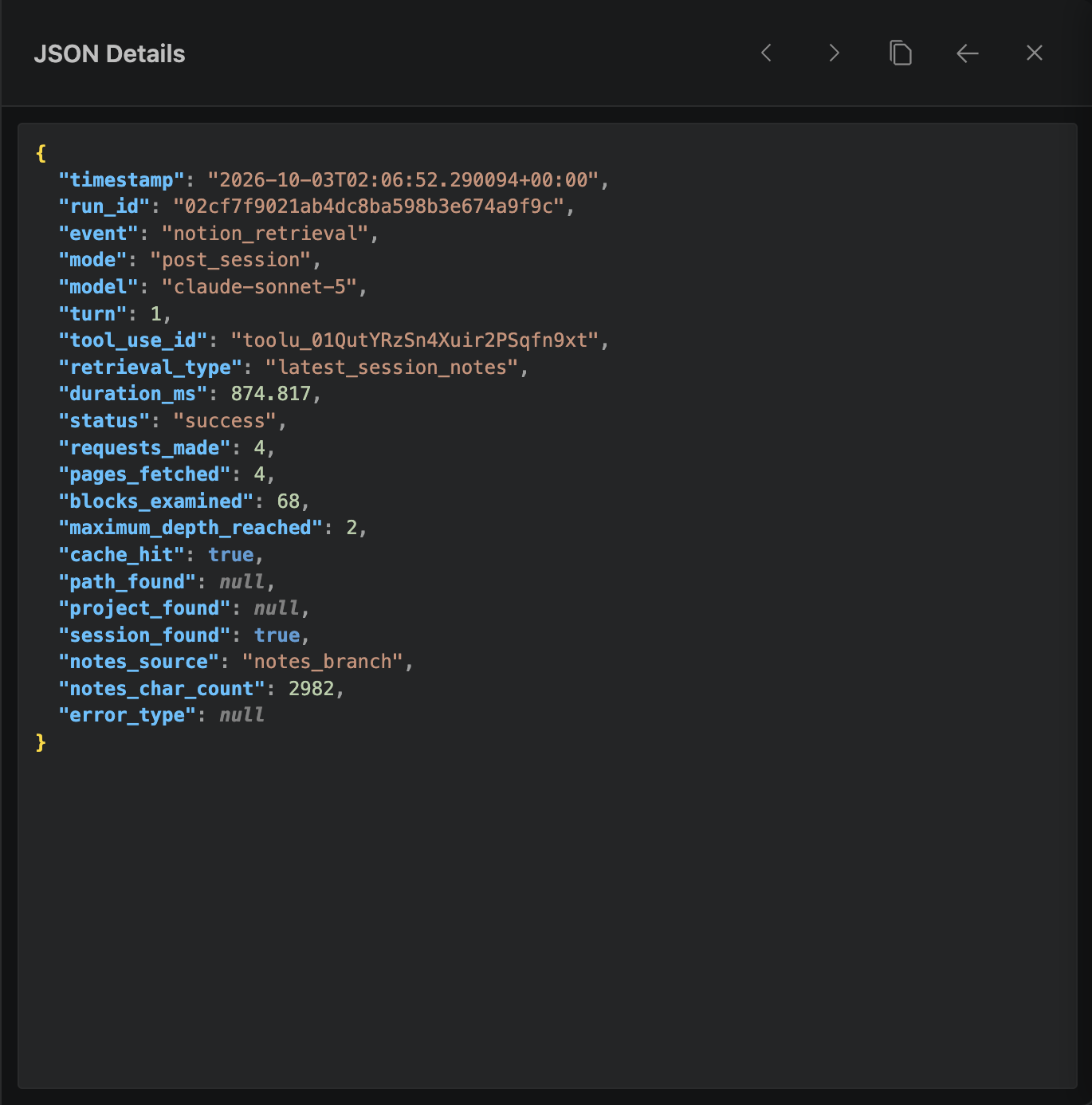
It excludes student names, transcript contents and filenames, prompts, tool inputs and results, model responses, Notion IDs and URLs, API keys, and exception messages. Each event type has an explicit allowlist, preventing unexpected data from entering the trace.
The transcript presented an interesting tradeoff. When two runs produce different results, I need to know whether they used the same input—but I do not need the transcript itself in the log. I record its character count and a SHA-256 fingerprint instead. This lets me compare inputs without copying their contents.
The fingerprint is neither anonymization nor encryption. It serves one narrow purpose: identifying whether two local runs used the same normalized transcript. Similarly, a stable, non-identifying student ID lets me associate runs without logging a student’s name.
This approach makes some debugging harder. If the model produces a poor response, the trace cannot show me the original language that caused it. I must return to the local input and output, using the metadata to narrow down what happened. That limitation is intentional.
The goal was not to collect everything that might someday be useful. It was to collect the minimum evidence needed to answer foreseeable questions. In a system handling sensitive information, more visibility is not automatically better visibility. What a system chooses not to record is part of its observability design.
Beyond completion
Before adding observability, I could see the agent’s final response but not much about how it arrived there. A polished response could make the run seem successful, even if the model had skipped an important retrieval step or acted on incomplete context.
The observability layer showed me that success is not binary. A
Notion request could return a 200 OK response, while
the application fails to find an exact match for the provided
student name. A tool can execute successfully while returning
incomplete information. And even more importantly, the agent itself
could reach end_turn while providing an inaccurate or
unhelpful response.
The traces capture several events:
notion_request: whether the external API operation succeeded;notion_retrieval: whether the application found and interpreted the expected information;tool_execution: whether the agent’s requested tool completed;run_completedandrun_failed: the outcome of the entire run.
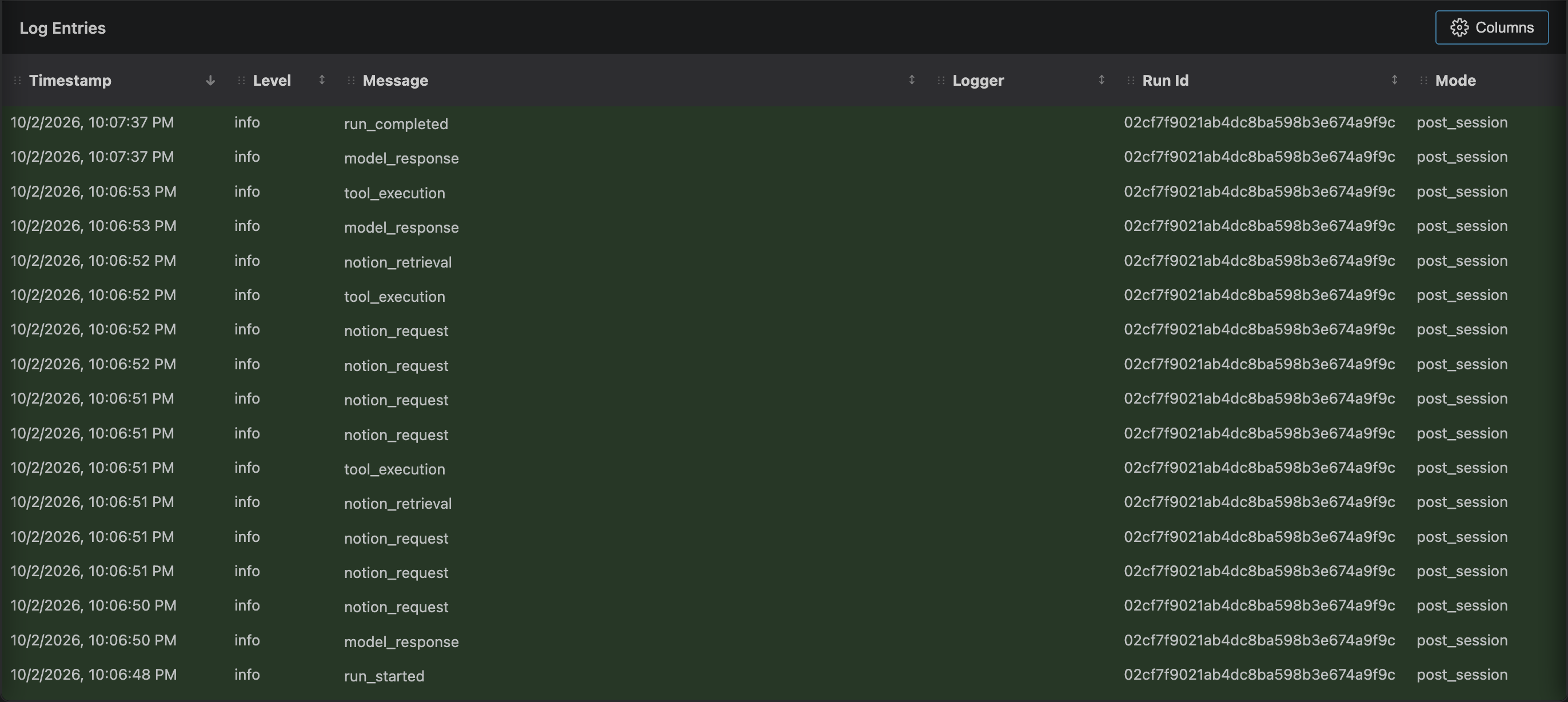
Because these events share identifiers, I can reconstruct a run’s sequence. Instead of seeing only that the agent failed, I can identify where the failure began and how far it propagated through the system. A Notion API error, for example, appears differently from a successful request that simply found no matching session notes.
But a fully reconstructed trace still has an important limitation: it shows what the system did, not whether the result was good. A trace can confirm that the agent retrieved student context, loaded a path guide, called two tools, used a certain number of tokens, and completed without an exception. It cannot determine whether the session notes accurately represent the transcript, whether the suggested objectives are useful, or whether the response’s tone is appropriate.
Those questions require evaluation. Owning the agent loop made the workflow observable, but it also exposed the harder problem: determining whether an apparently successful result is actually high quality.